
Ransomware has evolved. Modern threat operators deliberately target backup infrastructure before initiating encryption — this is no longer an accident of targeting, it's a deliberate tactic. According to the Veeam Ransomware Trends Report, in 93% of incidents attackers attempt to compromise backup repositories, and in 75% of those cases they at least partially succeed.
Classic protection strategies — 3-2-1, tape air-gaps, offsite replicas — break down when the attacker has weeks of dwell time inside your network and a complete picture of your topology. Dell PowerProtect Cyber Recovery addresses exactly this threat: it creates an isolated recovery environment that remains unreachable from the production network even under conditions of full infrastructure compromise.
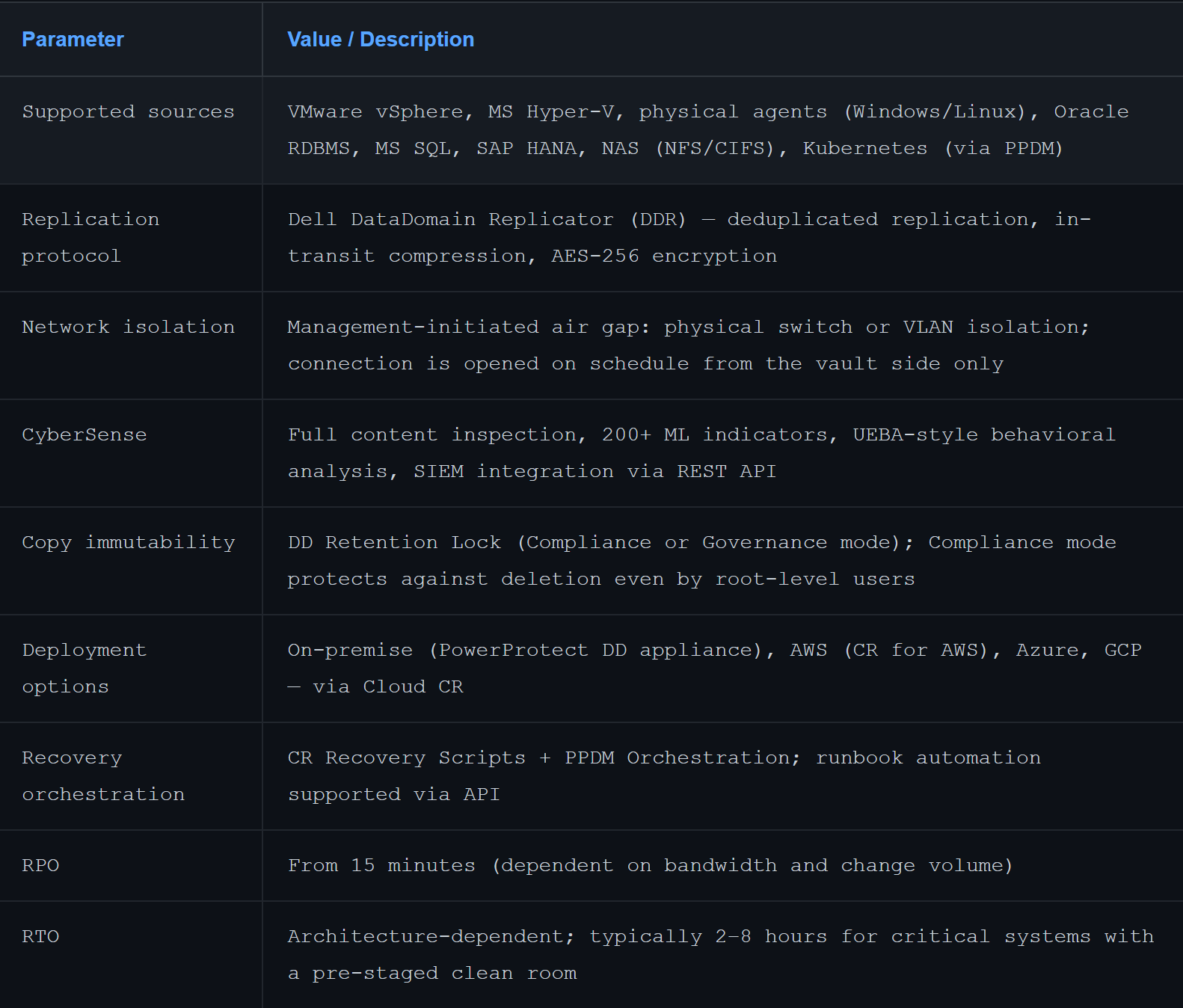
CyberSense is a discrete software component installed on a dedicated server inside the vault. The critical distinction: it reads original data, not snapshots or metadata. This enables detection of sophisticated attacks that deliberately preserve file sizes and timestamps to evade conventional monitoring.
Note for architects: CyberSense does not operate in real time against the production environment — it analyzes data inside the vault after each sync cycle. Detection latency equals your sync interval. For real-time threat detection in the production environment, EDR/XDR integration remains necessary. CR and EDR are complementary layers, not substitutes.
1. Incident Declared: SOC receives alert, IR plan is activated. Production network is isolated.
2. Vault Analysis: CyberSense generates a full report across all backup copies. Last-known-good point is identified with a confidence score.
3. Clean Room Activation: Isolated compute environment inside the vault — either pre-staged or deployed via runbook — with its own dedicated network segment.
4. Recovery and Verification: Systems are brought up from clean copy, functional testing is performed, remediation applied (patching, hardening) before production return.
5. Controlled Failback: Production restoration with elevated behavioral monitoring and enhanced audit logging for the first 72 hours post-recovery.
REST API — full management plane: policy creation, sync triggering, recovery initiation, CyberSense report retrieval.ServiceNow, Splunk, IBM QRadar via Syslog / REST webhook.VMware vCenter integration for VM recovery orchestration.Ansible playbook support for infrastructure-as-code workflows.Dell PowerProtect Cyber Recovery is not a replacement for standard backup — it is an additional defense layer that closes a specific and critical gap: the destruction of backup infrastructure as a deliberate phase of a ransomware attack. Solution maturity is validated by real enterprise recovery cases. Effectiveness depends entirely on regular testing and a pre-staged clean room environment being in place before the incident, not after.
Submit a consultation request to learn more about how PowerProtect Cyber Recovery can give you the confidence that you’ll be able to quickly recover intact data and resume normal business operations after a cyberattack.


